
Purpose Of This Guidance

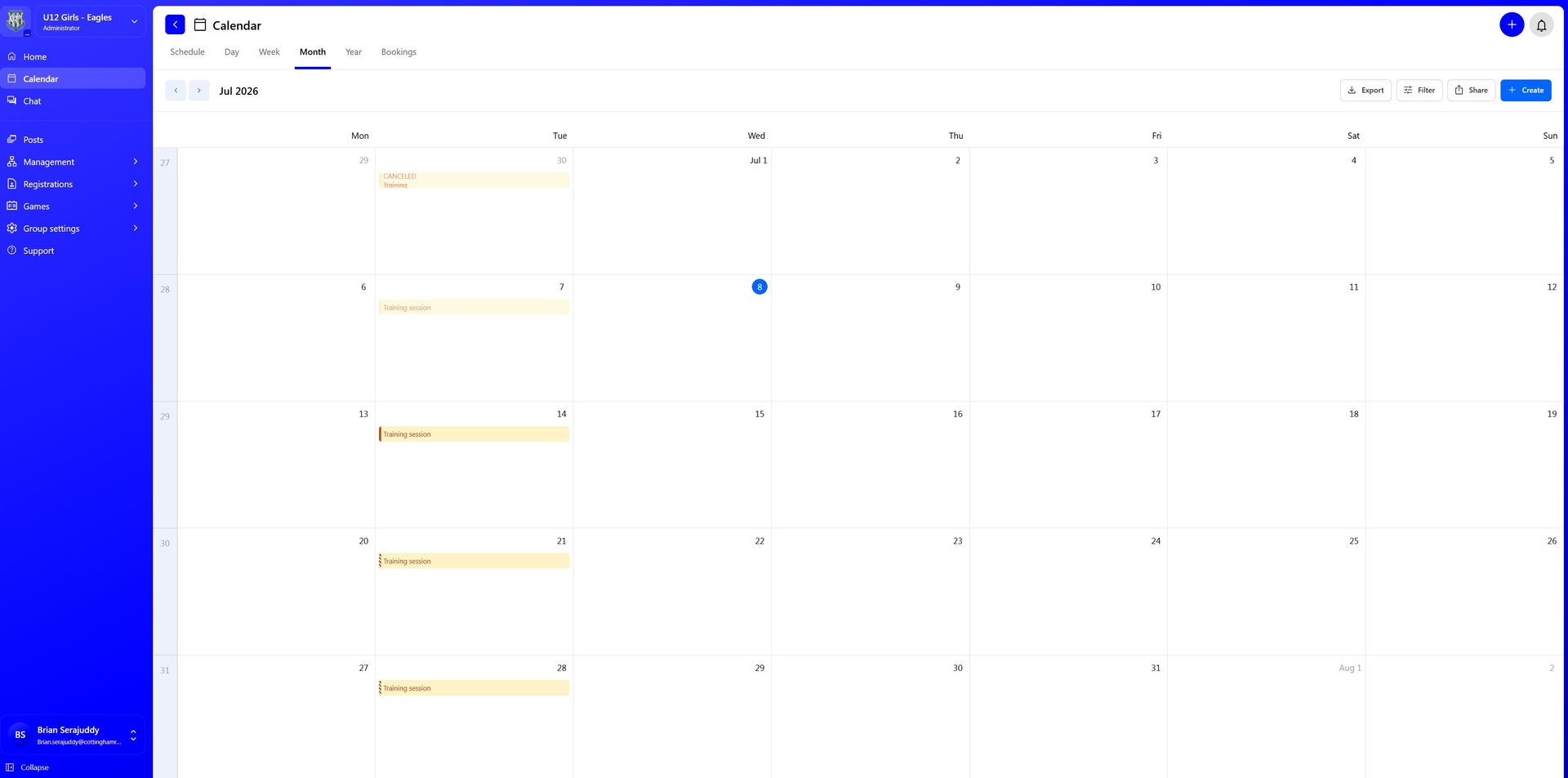
As a club, we add the training schedules for all teams into 360Player for the full season, running from July through to June.


At the end of each season, the schedule is reviewed and updated where required. This may include adding new teams, adjusting training slots, responding to coach requests, or making changes based on pitch availability and club requirements.


This has been done centrally so that every team has an allocated training slot and pitch resource recorded in one place. By managing this centrally, the club can identify any clashes, avoid double-booking pitches and make sure teams have the correct training space available.


It also gives coaches, players and parents a consistent way of managing training availability, attendance and communication across the club.


Important note

This process is being introduced to help coaches, not to create unnecessary admin.

By using 360Player consistently, we can manage pitches better, plan sessions more effectively, improve communication with parents, support welfare standards and keep better records across the club.


Thank you for your support in helping us make this work across all teams.


(Note: all images on this page are taken from the mobile app and will therefore differ from the browser based website)


Why We Are Doing This

The main reasons are:


Pitch and resource management
Each team is allocated a specific pitch or training area. Recording these centrally helps the club check that no teams are clashing over the same space.

Consistency across the club
All teams using the same process makes things easier for coaches, parents, players and club volunteers.

Automatic invitations and reminders
360Player will automatically invite coaches and players to training one week before each session. If parents or coaches do not respond, the system will continue to send reminders.

Better session planning
Coaches can see who is available before training, which helps with session planning, numbers, equipment and coaching ratios.

Welfare and safeguarding
Having an accurate record of expected attendance helps coaches understand who should be at training, who is missing, and whether the correct number of coaches/adults are available for the number of players attending.

Club governance and FA accreditation standards
As an England Football Accredited 3-star club, we are expected to operate in a structured, well-managed and consistent way. Using 360Player to manage training, attendance and communication supports the standards we are trying to maintain as a club.

Attendance records
Keeping attendance records allows coaches to see patterns over time. This can be useful when reviewing commitment, availability, development opportunities and discussions around match-day involvement or game time.


A screen prompts to create or connect to a player account. Options: Create new or connect to existing. Cancel button.

How The Training Events Work

For each training event:

  • The team’s training slot is already scheduled.
  • The pitch/resource is allocated centrally.
  • Coaches and players attached to the team are included.
  • New players or members added to the team should automatically be included in future training events.
  • Invites are sent one week before the session.
  • Parents and coaches are asked to respond to say whether the player is attending.
  • 360Player will send follow-up reminders where no response has been received.
  • Some pitches are split into zones in 360Player, for example 3GDU zones A, B, C and D. This is only to help the club allocate multiple teams to the same pitch and avoid clashes. It does not matter which exact area of the pitch a team uses on the night, as long as teams work sensibly with each other and do not interfere with the space being used by other teams.


This means coaches should not need to manually create weekly training events unless a session is changed, cancelled or added outside the normal schedule.

What Coaches Need To Do

Coaches should use 360Player to check player availability before each training session.


All coaches are asked to:

  • Use the training events already created in 360Player.
  • Check availability before training.
  • Encourage parents to respond.
  • Record attendance where possible.
  • Avoid creating duplicate training events.
  • Tell the club if a session is cancelled or moved.
  • Use the information fairly and responsibly.
  • Support the club in making 360Player the consistent system across all teams.


Before training, coaches should:

  • Open the upcoming training event.
  • Review who has responded as attending.
  • Review who has declined.
  • Check who has not yet responded.
  • Plan the session based on the expected numbers.
  • Follow up with parents where needed.
  • Make sure enough coaches/adults are available for the number of players attending.
  • Mark attendance accurately after the session where possible.


The aim is not to create extra admin for coaches. The aim is to make training easier to manage and give everyone better visibility.


Checking Who Is Available For Training

Suggested process:

  • Open 360Player.
  • Go to your team.
  • Open the calendar or events section.
  • Select the next training session.
  • Check the availability responses.
  • Note who is attending, unavailable or has not responded.
  • Use the numbers to plan your session.


Where parents have not responded, please encourage them to do so. Knowing the numbers in advance helps coaches plan better sessions and avoids turning up without enough players or support.


Marking Attendance

Where possible, coaches should mark who actually attended the session.


This is important because availability and attendance are not always the same. A player may say they are attending and then not turn up, or may attend without responding.


Accurate attendance records help the club and coaches understand:

  • Which players are regularly attending training.
  • Which players may need support or follow-up.
  • Whether team numbers are healthy.
  • Whether a team needs additional players.
  • Whether coaches have enough support.
  • Whether attendance is affecting match-day planning.


Attendance should be recorded factually and fairly. It should not be used to single out players, but it can support honest and transparent conversations where needed.


Changes, Cancellations or Issues

If a training session needs to be cancelled, moved or changed, coaches should update the event in 360Player as soon as possible and communicate clearly with parents.


Examples may include:

  • Bad weather.
  • Pitch closures.
  • School events.
  • Coach availability.
  • Tournament or match conflicts.
  • Bank holidays.
  • Club events.


Where a regular training slot or pitch allocation needs to change, coaches should contact the club before making changes so that pitch clashes can be checked centrally.
Mobile app screen listing child contacts and club memberships with an edit button.

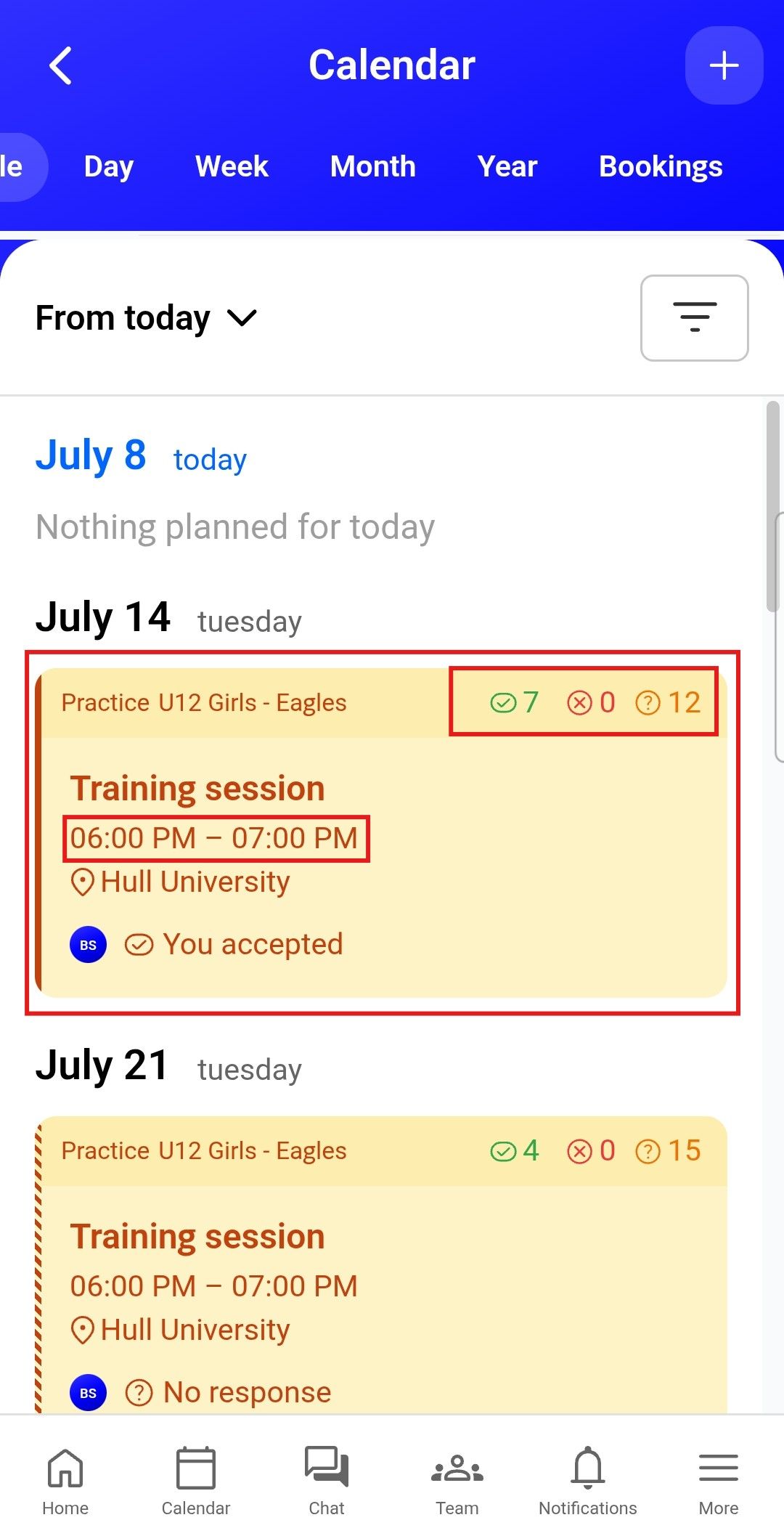
In the calendar view, you can see each event, including the start time and the number of participants who have accepted, declined or not yet responded.
Mobile settings screen.  Highlights a

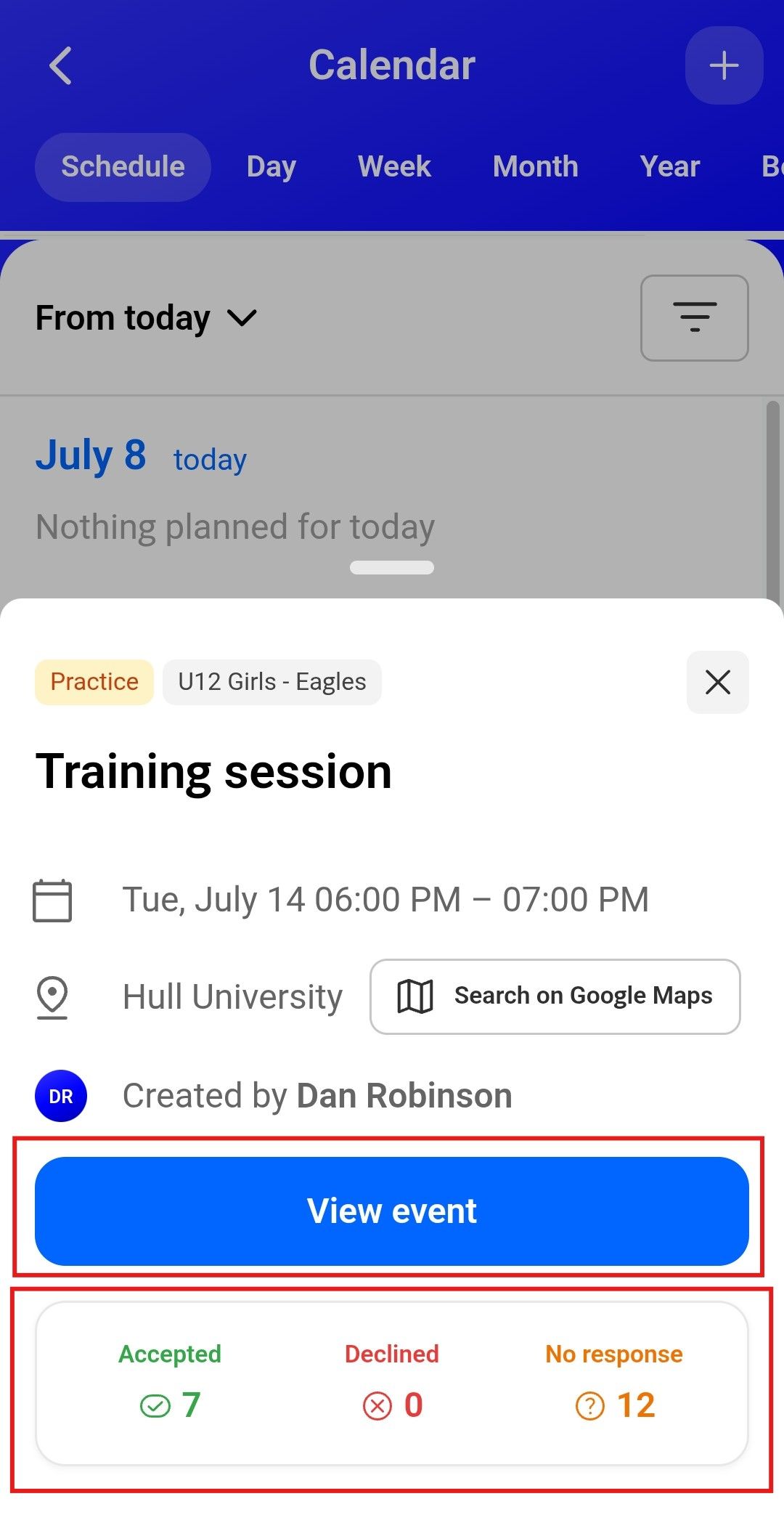
Selecting an event will open a more detailed summary, showing the location, time and participant responses, including who has accepted, declined or not yet responded.


Clicking View Event will open the full event details, where coaches can see more information and manage the event if required.
Connect parent screen with a link to connect with child and copy button.

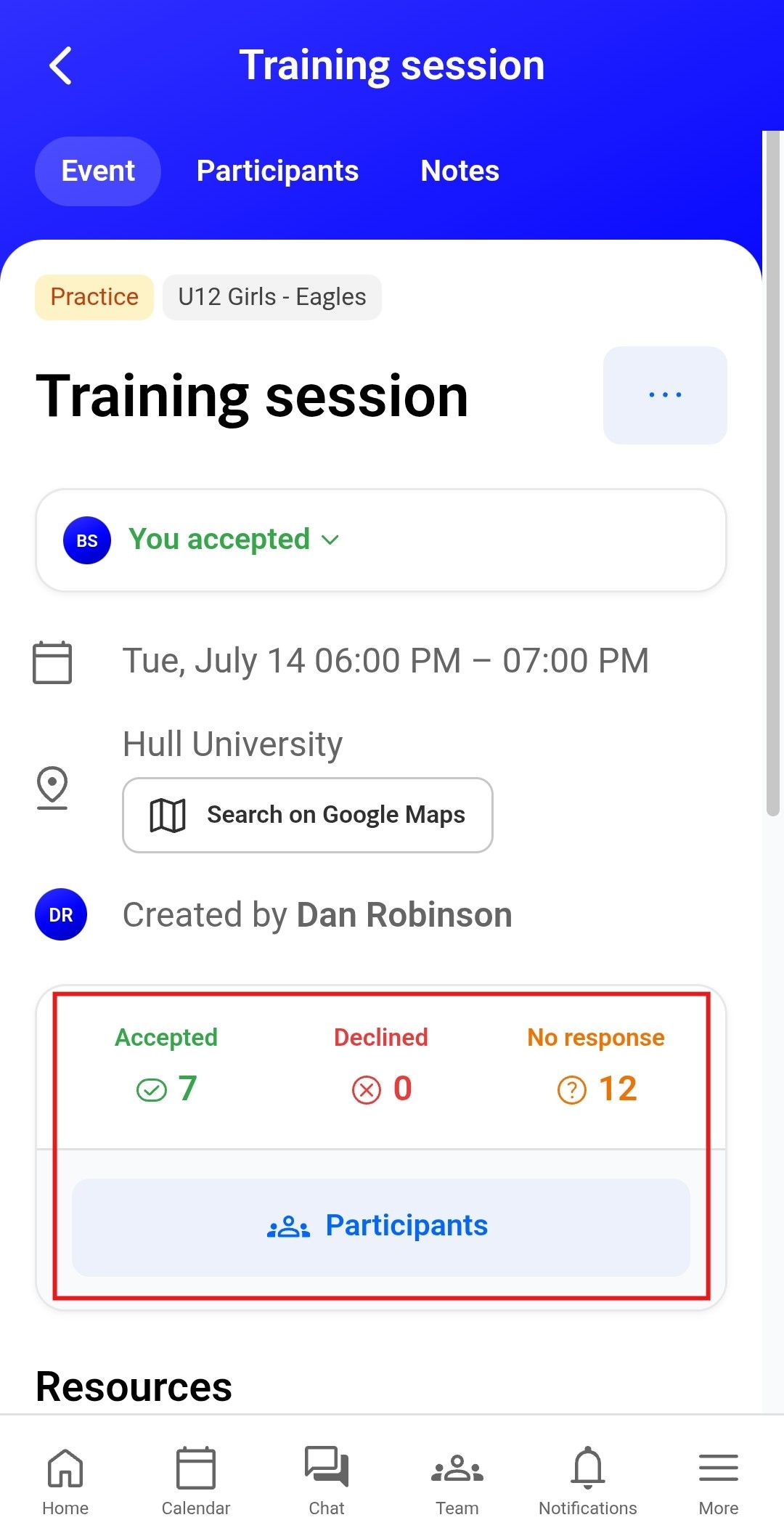
Selecting an event will open a more detailed summary, showing the location, time and participant responses, including who has accepted, declined or not yet responded.


Clicking the Accepted, Declined or No Response numbers will show a detailed list of participants in each category, allowing coaches to see who is attending, who is unavailable and who has not yet responded.
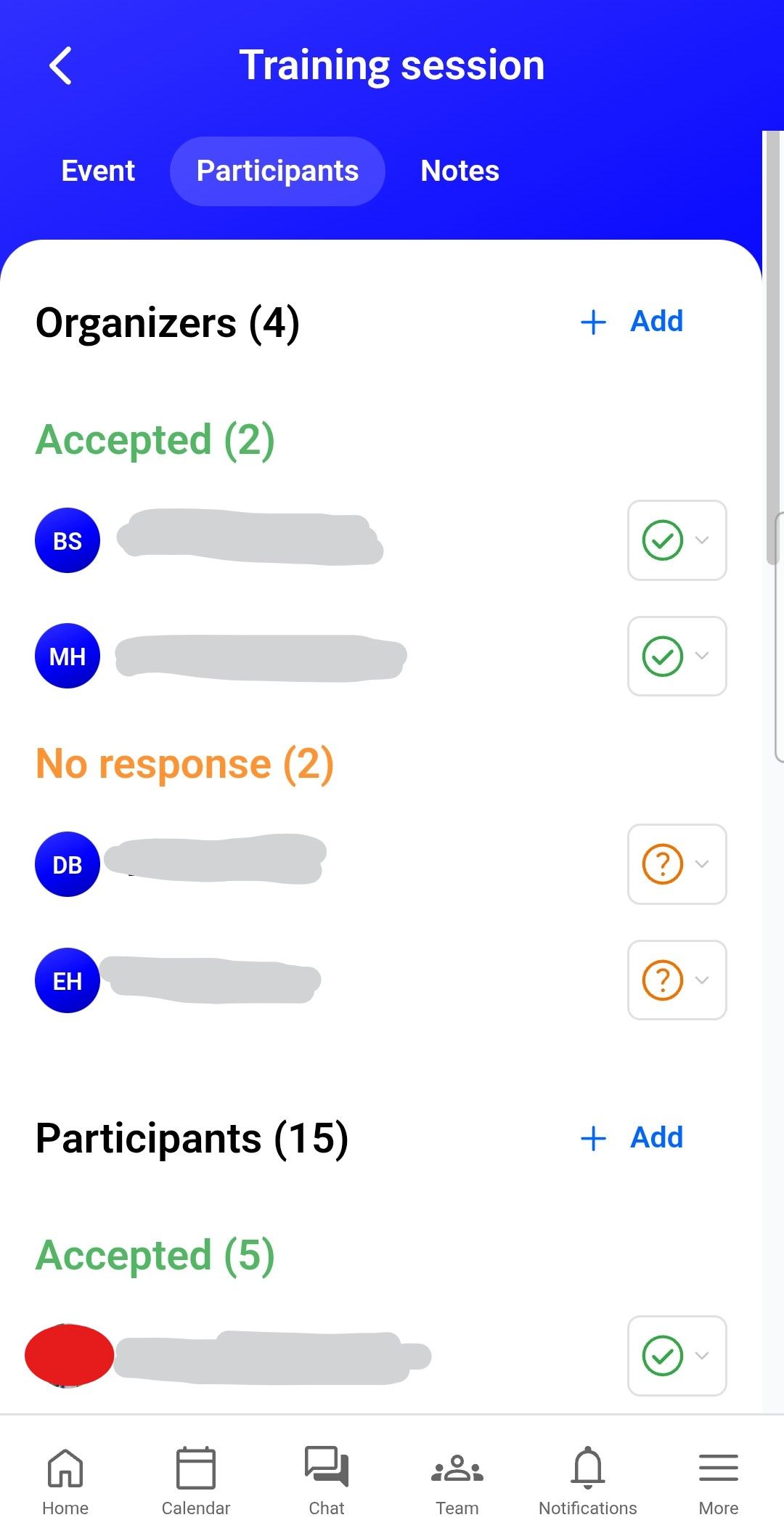
This view provides a detailed list of participant responses, showing who has accepted, declined or not yet responded to the event.


Coaches can also use this screen to send reminders, add additional participants, or manually update a participant’s response status if needed.

Sharing the 360Player Calendar with Personal Calendars

Coaches and parents can also sync their 360Player calendar with their personal calendar, such as Google Calendar, Apple Calendar or Outlook. This allows training sessions, matches and other team events to appear alongside their normal personal, work or family calendar.


This is useful because it helps families keep track of upcoming sessions without needing to manually copy dates across. It also reduces the chance of missed training sessions, missed match-day details or late responses to invites.


Where possible, coaches should encourage parents to connect their 360Player calendar to their personal calendar. This is especially helpful for families with more than one child, busy schedules or multiple team commitments.


Important points to note:

  • The 360Player calendar should remain the main source of truth for team events.
  • Personal calendar syncing is mainly for convenience and visibility.
  • Parents and coaches should still respond to availability requests in 360Player.
  • If a session is changed or cancelled, coaches should update 360Player first.
  • Personal calendars may not always update instantly, so parents should check 360Player if they are unsure.


Using calendar syncing should make it easier for everyone to keep track of training and match commitments, while still keeping all official team communication and availability responses inside 360Player.

Screen displaying options to add more children to an account: create a new account or connect an existing one.

From the calendar view, select the hamburger menu to open the additional options available for the calendar.

Click the share icon next to the relevant group calendar to publish it to your personal calendar, such as Google Calendar, Apple Calendar or Outlook.

Copy the calendar URL, then add it to your personal calendar by following the instructions provided by your calendar provider, such as Google Calendar, Apple Calendar or Outlook.

Welfare and Safeguarding

Using 360Player properly helps support good welfare practice.


Coaches should know who is expected at training and who is actually present. This helps with:

  • Player safety.
  • Emergency planning.
  • Knowing who is under the care of the coaches during the session.
  • Making sure there are enough adults present.
  • Identifying unexpected absences.
  • Managing late arrivals or early collections.
  • Supporting communication with parents.


If a player is expected but does not arrive, coaches should use their judgement and, where appropriate, check with the parent/carer.


If there are any welfare concerns, coaches should follow the club’s safeguarding process and speak to the Club Welfare Officer.

Parent responses

Parents should be encouraged to respond to training invites as soon as possible.


A simple message to parents could be:


“Please can all parents respond to the training invite in 360Player as soon as possible. This helps us plan the session properly and make sure we have the right number of coaches available.”


Coaches should remind parents that responding to invites is part of helping the team run smoothly.

Using attendance records

Attendance information may be useful when coaches are making decisions around:

  • Match-day squads.
  • Player development.
  • Training commitment.
  • Team numbers.
  • Player availability.
  • Conversations with parents around game time.


However, attendance should be considered alongside other factors, such as attitude, effort, development needs, confidence, welfare, injuries, holidays and individual circumstances.


The attendance record gives coaches factual information to support fair and consistent decision-making. It should not be used as the only factor when making decisions about players.